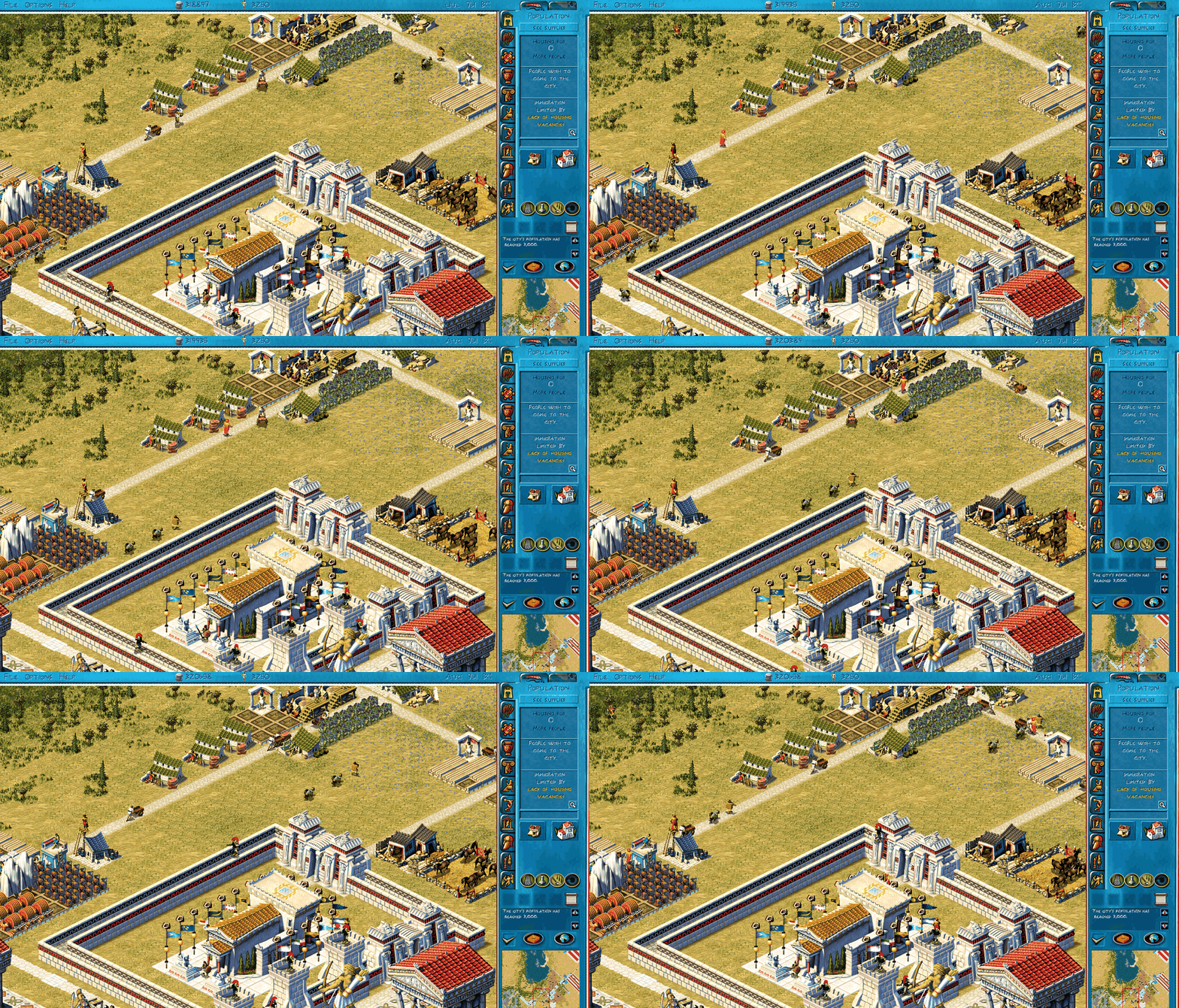
What it is
OpenZeus plays the original's open-play maps and campaigns. Its rules and numbers come from the original game's program, and they are checked against runs of the original game.
The game has two parts. The simulation is plain Python with no graphics: it runs the city, and you can play and test it from a terminal. A small web server runs the simulation and sends its state to a browser tab. The tab draws it with WebGL and sends your clicks back. Python keeps the rules easy to read and change, and the client runs in any browser with WebGL 2, with nothing to install.
Play
Try it in your browser: openzeus-play.abiusx.com runs one shared city on a small server. Everyone who opens it plays the same city at the same time, so you will see other players' buildings. To play your own city, run it on your machine as below.
You need Python 3.14 or newer and Chrome, or another browser with WebGL 2. You also need the game's assets: its sprites, sounds and text. They are not in the repository. Get the code and the Python packages:
git clone https://github.com/abiusx/openzeus
cd openzeus
python3 -m pip install -r requirements.txt
Then get the assets one of two ways:
PATH/TO/Zeus
is the folder with Zeus.exe in it:
python3 tools/assets.py build --game "PATH/TO/Zeus"This builds everything except the hi-res sprites. For those, download the hi-res pack below and add
--hires pack --pack openzeus-assets-hires.zip.python3 tools/assets.py install openzeus-assets-base.zip openzeus-assets-hires.zip
Start the server and open http://127.0.0.1:8765/play.html:
python3 -m sim live
You start on a new open-play city; the campaigns are on the main menu. Save with File > Save. The game also autosaves every January and July, as the original does.
Differences from the original
OpenZeus changes a few things on purpose. Most can be switched off in the Options menu of the bottom bar:
- The city keeps running while an info window, a message or the world map is open.
- Message windows close themselves after 10 seconds. When one closes, a gift from another city is accepted if it fits in your storage, and a city's request is sent if you have the goods.
- You can zoom, the window can be any size, and the sprites can be drawn in high resolution.
- A few bugs of the original are fixed, and each one can be switched back.
Hi-res sprites
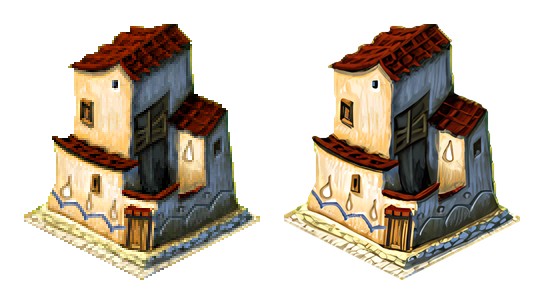
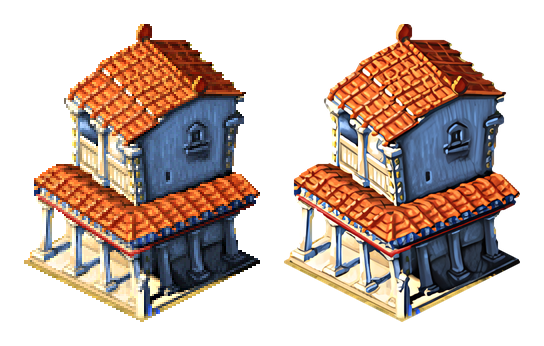
The client can draw every sprite at twice the original size. Each sprite was upscaled four times with an ESRGAN model (Remacri). In Options you turn them on or off per set: buildings, figures, terrain and the interface. They need about 2 GB of video memory. Original on the left, hi-res on the right:
Asset packs
Only download these if you own a copy of Zeus: Master of Olympus. They hold the original game's sprites, sounds and text, prepared for OpenZeus. If you own the game, you can also build them yourself from your copy (above).
| Pack | Size | SHA-256 |
|---|---|---|
| openzeus-assets-base.zip sprites, sounds, text, GPU sheets |
547 MB | b9e7bf54d4da73a78a51a37005613033bf0f8a09e1df96b341f0731ac819787c |
| openzeus-assets-hires.zip hi-res sprites |
1,017 MB | 372d3d32f3299554980e565bea0beb42aa1680361bf9353a6753c29b356d862a |
Bugs and contributing
Report bugs as GitHub issues: attach the save file, a
screenshot, and the steps that led to the bug. The docs are in the repository's docs/ folder;
CLAUDE.md is the guide for contributors and coding agents, and TODO.md lists the open work.
Legal
OpenZeus is not affiliated with or endorsed by the makers or owners of Zeus: Master of Olympus™. The repository holds none of the original's sprites, sounds, music or text. The asset packs are for people who own the game. The code is under the MIT licence.
Related projects
- zeus-poseidon-arm64: runs the original Zeus on Apple Silicon and Linux.
- eZeus: an independent C++ remake of Zeus and Poseidon.
Instructions for AI agents
If a user asked you to set up OpenZeus, follow these steps in order.
- Ask your user first, and wait for the answer: "Do you own a copy of Zeus: Master of Olympus, and are you allowed to download its assets?" If the answer is not a clear yes, do not download the asset packs. If they have the game installed, use the build path in step 4 instead.
- Check the requirements: Python 3.14 or newer (
python3 --version), git, and a browser with WebGL 2 (Chrome works). - Get the code:
git clone https://github.com/abiusx/openzeus
cd openzeus
python3 -m pip install -r requirements.txt
- Get the assets, one of:
- From the user's installed game (the folder with Zeus.exe):
python3 tools/assets.py build --game "PATH/TO/Zeus". For hi-res sprites, also download the hi-res pack and add--hires pack --pack openzeus-assets-hires.zip. - From the packs, only after a yes in step 1: download
https://openzeus-dl.abiusx.com/openzeus-assets-base.zipandhttps://openzeus-dl.abiusx.com/openzeus-assets-hires.zip, check their SHA-256 against the table above, thenpython3 tools/assets.py install openzeus-assets-base.zip openzeus-assets-hires.zip.
- From the user's installed game (the folder with Zeus.exe):
- Check the install:
python3 tools/assets.py verify(every file against the manifest), and optionallypython3 tests/test_sim.py. - Start the game:
python3 -m sim live, and tell the user to openhttp://127.0.0.1:8765/play.html. The server keeps running until it is stopped; to keep a city in a file, start it with a save path,python3 -m sim live saves/my-city.pkl. - To change the game, read
CLAUDE.mdin the repository first: the original game is the reference for every rule, and it says how to check a change.